

The best gaming laptops under 1000 need an exact model match. This shortlist separates three configurations. Two are Nitro V 15 models with different screen specifications. They are not three different brands. We rank the HP first for its supplied memory, then the two Acer options by their stated panel refresh rate. This is a parts-based order, with no claim that we measured one laptop to be faster.
#1. HP Victus 15-fa1040nr: more memory fitted
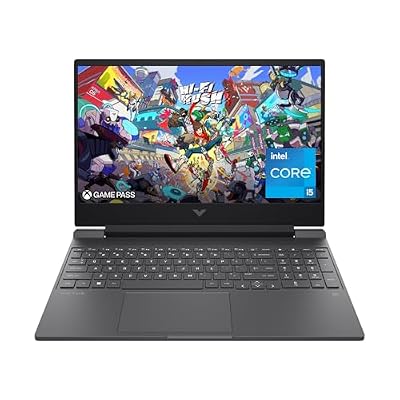
HP Victus 15-fa1040nr HP Victus 15-fa1040nr
Our verdict:
More RAM supplied
Start here if you want the listed RTX 4050 with 16GB of factory RAM and can accept the panel's limits.
Keep in mind: Both RAM slots are occupied. HP lists a 250-nit, 45% NTSC panel; the screen is a compromise for color work.
View on Amazon- Core i5-12500H; RTX 4050 Laptop GPU, 6GB
- 16GB DDR4-3200 fitted as two 8GB modules
- 512GB SSD; 15.6-inch Full HD 144Hz IPS panel
Product details checked October 2026
The HP is the first configuration to assess if you want more memory already fitted. Its Core i5-12500H and RTX 4050 Laptop GPU sit alongside 16GB of DDR4-3200 memory. HP identifies the modules as two 8GB sticks. That removes an immediate memory purchase for a buyer whose apps call for that amount.
The screen needs more care. A 144Hz refresh rate is useful to record, but it cannot cancel the stated brightness and color limits. Do not choose this panel for critical color work without suitable evidence. Its 5.06lb laptop-only weight also leaves the adapter and cables outside the carry figure.
Read our Victus 15 configuration review for the exact HP product number, port checks and battery-test limits. Choose from those facts rather than a claim that every Victus has the same parts.
#2. Acer Nitro V ANV15-52-586Z: higher stated refresh

Acer Nitro V ANV15-52-586Z Acer Nitro V ANV15-52-586Z
Our verdict:
165Hz option, 8GB RAM
Compare this setup when you want its listed Full HD 165Hz panel and are willing to resolve memory needs before ordering.
Keep in mind: Only 8GB of RAM is supplied. The refresh specification is not a measured game-speed or panel-response result.
View on Amazon- Core i5-13420H and RTX 4050 Laptop GPU
- 15.6-inch Full HD IPS screen, 165Hz
- 8GB DDR5 RAM; 512GB SSD
Product details checked October 2026
This Nitro V combines a Core i5-13420H with an RTX 4050 Laptop GPU, a 512GB SSD and 8GB of DDR5 memory. Its 15.6-inch IPS screen is specified at 165Hz. Keep the full ANV15-52-586Z code: it is a different configuration from the 144Hz model below.
The installed RAM is the reason to slow down before choosing it. If your workload needs more, check the correct service record and fitting plan. Do not assume a memory upgrade is included because the listing names a higher supported maximum. Include any required parts in the complete purchase decision.
We have no matched test showing a benefit over the HP in your games. A higher refresh ceiling cannot supply missing frames. It also cannot prove screen brightness or color quality. This option makes sense only if you accept those evidence gaps and its supplied memory.
#3. Acer Nitro V ANV15-51-51H9: a separate 144Hz configuration
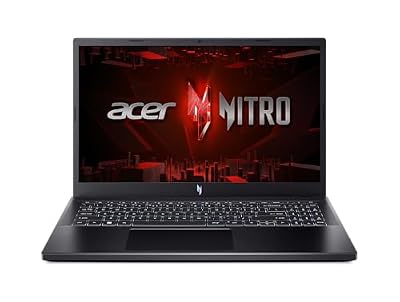
Acer Nitro V 15 ANV15-51-51H9 Acer Nitro V 15 ANV15-51-51H9
Our verdict:
144Hz alternative, 8GB RAM
Consider this exact model when its listed RTX 4050 and 144Hz Full HD panel fit your plan and you can address the modest RAM supplied.
Keep in mind: It includes 8GB of RAM. Do not transfer the newer Nitro V's slot layout or panel claims to this model.
View on Amazon- Core i5-13420H and RTX 4050 Laptop GPU
- 15.6-inch Full HD IPS screen, 144Hz
- 8GB DDR5 RAM; 512GB SSD
Product details checked October 2026
The ANV15-51-51H9 shares a CPU and GPU name with the other Acer, but it has its own parts record. This one lists a 144Hz IPS screen, 8GB of DDR5 memory and a 512GB SSD. Those similarities do not establish equal cooling, power limits or measured speed.
We keep it separate so a change in a store's selected variant is visible. It is not a third brand, a benchmark winner or an automatic substitute for the 165Hz configuration. Match the complete code and consider whether either Acer's memory limit fits your needs.
Our Acer Nitro V review assesses this precise model. It explains the missing game and battery tests and keeps Nitro V 16 facts out of the 15.6-inch review. Use it before treating any Nitro V name as a complete buying answer.
How we picked the best gaming laptops under 1000
The best gaming laptops under 1000 must pass two tests. The exact new laptop must fit the budget. Its documented parts must fit the task. A good parts list cannot excuse an over-budget offer. A low price cannot excuse an unclear model or a missing requirement.
We compare named sources without claiming hands-on tests. Each pick needs an exact model, a useful fit and a real drawback. A missing fact stays unknown.
HP's 15-fa1040nr model sheet identifies its fitted RAM and screen limits. The Acer catalog records identify two separate full model codes. We do not transfer service facts or measured results between them. A current offer check qualifies the purchase link; it is not a game or battery test.
Our price rule applies to a new laptop for a US buyer in US dollars. A qualifying offer must fall below the ceiling. Refurbished, used and open-box listings do not count as new. A family name or a low starting-price banner cannot qualify another configuration on the same page.
If a product rises above the ceiling, it leaves the qualifying picks. If price evidence expires or the source fails, it cannot keep a budget-qualified label on the strength of yesterday's check. The table must remain useful without turning stale data into a purchase claim.
Start with games and the way you use the laptop
Write down the games you actually play, the screen you use and the visual settings you can accept. A competitive game at lower settings is a different task from a demanding story game at high detail. Check each game's current official requirements rather than a store's broad gaming label.
Requirements tell you where to start. They do not promise a frame rate or a smooth game at your chosen settings. A laptop can meet the minimum and still fall short of what you want. Look for a matching measured test and read how it ran.
Include the work outside games. Class software or an editing app may rule out a laptop that looks good for games. Check that your apps will work first. Then compare small graphics differences. It is easier to avoid a mismatch than to fix it after checkout.
Decide where the laptop will run. At a desk, the adapter and external screen connections may matter most. For daily travel, the full carry load and unplugged work need more attention. A screen size alone tells you neither the bag fit nor the battery result.
GPU and CPU: compare the complete system
The GPU renders the game. The CPU handles game logic and general tasks. They work together, so do not rank a laptop from one badge. Intel's buying guide also treats the laptop as a whole-system choice.
Keep laptop GPU names separate from desktop results. NVIDIA's laptop comparison identifies the mobile products and their memory specifications. A desktop chip with a similar name is not evidence of laptop performance.
Configured graphics power is another field to check. Two laptops with the same GPU name may have different power limits. A maximum figure is a permitted operating limit, not a measured frame rate. Do not convert wattage differences into a made-up performance score.
Likewise, a CPU tier is not a whole-laptop verdict. Read the full processor name and the tested setup. A more expensive CPU may be useful for your work, but it can leave less budget for another part you need. Compare that trade-off against the actual task.
Installed RAM and SSD space belong in the budget
RAM is the working memory available to games and open apps. Check how much comes installed and how it is fitted. The total amount alone does not show whether one or both slots are occupied. That can alter the cost of reaching your intended capacity.
An upgrade path helps only if the parts and work fit your plan. Check which type of RAM you need and how much the maker allows. Compare the full upgrade cost with a factory option. Do not call a low-memory laptop a better buy while ignoring the purchase it needs next.
Our HP Victus RAM guide shows how to handle conflicting capacity evidence. A spare-parts list, processor limit and owner's report answer different questions. The full product record comes first, and any unresolved limit stays unconfirmed.
For storage, estimate your actual installed games and files. Leave room for the operating system and updates. Check expansion from the correct service record. An M.2 slot count can include a slot already occupied, and an empty slot may still need the right mounting parts.
Read the panel specification beyond refresh rate
Resolution is the pixel grid. Refresh rate is how often the screen can update. Neither establishes the frames your game will produce. A high refresh number also does not prove low blur or fast pixel response. Those need a suitable measurement.
Check brightness and color evidence for the selected panel. One laptop family can offer more than one screen. A review of the better panel does not establish the cheaper panel's quality. Match the exact configuration before transferring a display verdict.
For documents, think about text size and room for your work. For visual tasks, check the colors you need the screen to show. If an external display does that job, verify the laptop's display output and the cable or dock it needs. Do not infer a port's full function from the connector alone.
Our ASUS TUF Gaming F16 guide explains why panel and battery options must stay tied to model codes. The A15 guide keeps that family's options separate rather than treating every TUF as the same build.
Portability and battery: plan the task away from power
Check the laptop's dimensions and documented weight. Add the adapter and any accessories you must carry, where their weights are known. If the adapter weight is missing, record it as unknown. A laptop-only figure does not describe the whole bag.
For battery, start with the exact model and installed capacity. The size tells you how much energy it stores. Runtime tells you how long a task runs. Different parts can use that energy at different rates. Do not choose an all-day work laptop from battery size alone.
Read the Victus 15 battery guide to check the installed battery and task. The LOQ battery guide sets out named official tests and their limits. Neither invents a runtime for an untested setup.
Keep plugged-in gaming results separate from unplugged ones. A laptop can use different power rules on battery. If the source did not test battery-mode gaming, it has not established that mode's speed or duration. Plan access to a socket if your session depends on sustained gaming performance.
Read a listing without losing the exact configuration
Use this checklist before you compare two offers. It checks parts and fit; it is not a store catalogue. You can print it and add your own source links. Keep a question mark beside facts that the listing does not establish.
- Identity: Full manufacturer part number or MTM, plus the selected variation.
- Processor: Complete mobile CPU name, including its suffix.
- Graphics: Laptop GPU name, dedicated memory and documented power conditions.
- RAM: Installed capacity and module layout, with the correct model's upgrade record.
- Storage: Installed SSD and documented expansion requirements.
- Screen: Size and resolution, with refresh and any color or brightness evidence.
- Practical fit: Ports, carry load and evidence for your unplugged task.
- Buying terms: New condition and exact seller, with delivery and returns checked.
Read the cart's selected variant again before paying. A listing may switch between memory bundles or display options. The picture can stay the same while the hardware changes. A discrepancy should trigger a question, not an assumption that the better specification applies.
For Acer, start with our Nitro 16 guide. The Nitro V 16 guide covers a separate family. Keep the V in the name when searching. It is not a harmless letter to remove.
How we use sources and handle corrections
Maker documents tell you which parts a model has and how to service it. A measured review can add game or screen tests for a matching setup. It may also measure runtime. We name the tester beside those results. We do not present someone else's work as our own test.
Our checks keep source dates and configuration identifiers with the claim. We prefer a narrow fact that can be checked over a broad family verdict. A questionable entry in an official table still needs judgment. If it conflicts with other evidence, we flag it or leave it out.
Price qualification and hardware research are separate. A sound specification record does not prove stock. An available listing does not prove it has the hardware described in another review. Both must match before a complete recommendation is justified.
Use contact and corrections to report a mismatch. Include the page and full model code, plus the source URL. For measured claims, include the tested setup and settings. We check the primary record and fix the affected claim. We do not quietly move a result to another model.
More buying guides
Our gaming laptop brands comparison weighs three exact HP and Acer setups. It shows why a maker's name cannot replace a full parts record. Use it to compare supplied memory and screen facts without inventing a brand-wide reliability winner.
For class work, read our gaming and school laptop guide. It checks the course tools before the games, with supplied RAM and daily travel needs kept separate. A school requirement can change the choice even when the GPU looks suitable.
Our laptop CPU comparison separates three processor layouts from whole-system results. Use it to weigh the fitted RAM and GPU alongside the CPU, without turning core counts into a made-up game-speed score.
The gaming laptop display guide keeps refresh labels separate from screen-quality tests. Compare the exact panel record and any missing brightness or color evidence before calling one laptop's screen the better choice.
Factors to consider
- Name the games and daily apps that must work.
- Match the full model code and fitted parts.
- Check the supplied RAM before planning an upgrade.
- Read the screen evidence beyond its refresh rate.
- Keep unknown weight, runtime and game results visible.
- Check the selected variant again before ordering.
FAQ
What matters most in the best gaming laptops under 1000?
Start with the exact configuration and your actual games. Check the mobile GPU and CPU together, then installed RAM and the panel. Keep the total inside the budget. A familiar model name or higher processor tier cannot make up for an unclear variant or a missing requirement.
Can a laptop briefly above the ceiling stay in the picks?
It cannot keep a qualifying place while above the ceiling. The budget promise applies to the current exact offer, not a past deal or hoped-for price. Hardware guidance can remain useful, but it must stay separate from a current under-budget recommendation. Do not quietly stretch the ceiling to preserve a favorite.
Do these guides report hands-on testing?
No. We research manufacturer specifications and clearly attributable published evidence. We do not claim device ownership or an in-house test lab. Where a measurement is relevant, its source and exact setup must be clear. Missing game-speed, noise or runtime evidence stays unknown rather than becoming an invented result.
Should I buy a cheaper configuration and upgrade it?
Only after checking the correct model's upgrade record and the full cost. Existing modules may need replacement, and fitting can add work or expense. Compare that total with a suitable factory configuration. If compatibility or access remains unclear, a lower starting price alone does not establish a better choice.
Best gaming laptops under 1000: verdict
The best gaming laptops under 1000 are complete configurations that meet a documented task within a firm ceiling. Match the model before comparing claims. Keep unknown facts visible. Choose from the hardware you will receive and the total you will pay, with a real trade-off you can accept.